Low Balance Alerts and Insufficient Funds
Applicable role: Admin user Last updated: 2026-08-06
This page covers what happens when balance or quota runs out, how to receive low balance alerts in advance, and how to recover quickly. After reading, you will be able to distinguish between "insufficient balance" and "rate limiting" and know how to handle each.
1. What Happens When Funds Run Out
The actual deduction always comes from the credit balance (total quota pool). Running out manifests differently depending on which level is exhausted:
| Situation | Scope of Impact | How to Recover |
|---|---|---|
| Organization total quota pool insufficient | All members and all Keys under the organization cannot make calls | Top up the organization's total quota pool |
| A specific member's quota exhausted | Only all Keys under that member are rejected; others are not affected | Increase that member's quota pool limit (provided the total quota pool still has funds) |
When a call is rejected, the API returns a corresponding error message. The specific error codes and messages are determined by the actual API response; this manual does not enumerate them individually.
Request rejection may also be caused by hitting a limit: for example, a Key has rate limiting enabled and is called too frequently, or instantaneous concurrency is too high and gets throttled. These are not balance issues, and the resolution is different -- wait for the rate limit window to reset, or contact the platform to increase the concurrency limit if concurrency is the bottleneck (see Concurrency).
How to Distinguish
- Insufficient balance or quota exhausted: Top up, or adjust the member's quota.
- Rate limited / throttled: Wait for the window to reset, or reduce call frequency / concurrency.
2. Low Balance Alerts: Configure in the "Profile" Page
To avoid your balance being depleted without your knowledge and service suddenly stopping, you can enable a low balance alert: when the balance drops to your configured threshold, you receive an email notification in advance.
The entry is on the "Profile" page (scroll down to the "Low Balance Alert" section). If the platform has not enabled this feature, this section does not appear on the page. You can configure:
| Setting | Description |
|---|---|
| Toggle | Whether to enable the alert |
| Threshold | At what balance level (in credits) to trigger the alert; leave empty to use the default value |
| Notification Email | In addition to your account email, you can add recipients (e.g., finance or operations colleagues). Maximum 3, each must be verified with a verification code before taking effect, and can be individually enabled / disabled |
It is recommended to add finance / operations colleagues' emails so relevant team members also receive the alert. Specific fields are subject to the actual console interface.
3. Quick Recovery
Top-up and quota adjustments take effect immediately -- no need to log in again or recreate Keys:
- Organization balance insufficient: After topping up (see Top-up and Redemption Codes), the balance is available immediately and the next request can proceed.
- A member's quota exhausted: Increase their quota pool limit in Member Management; the change takes effect immediately.
During the insufficient-funds period, historical usage and API Key configurations are not affected. Once funds / quota are replenished, everything works as before.
4. Operational Recommendations
| Recommendation | Why |
|---|---|
| Enable low balance alerts early | Prevent the entire organization from losing service without notice |
| Leave sufficient quota for key members | Prevent critical calls from failing due to quota caps |
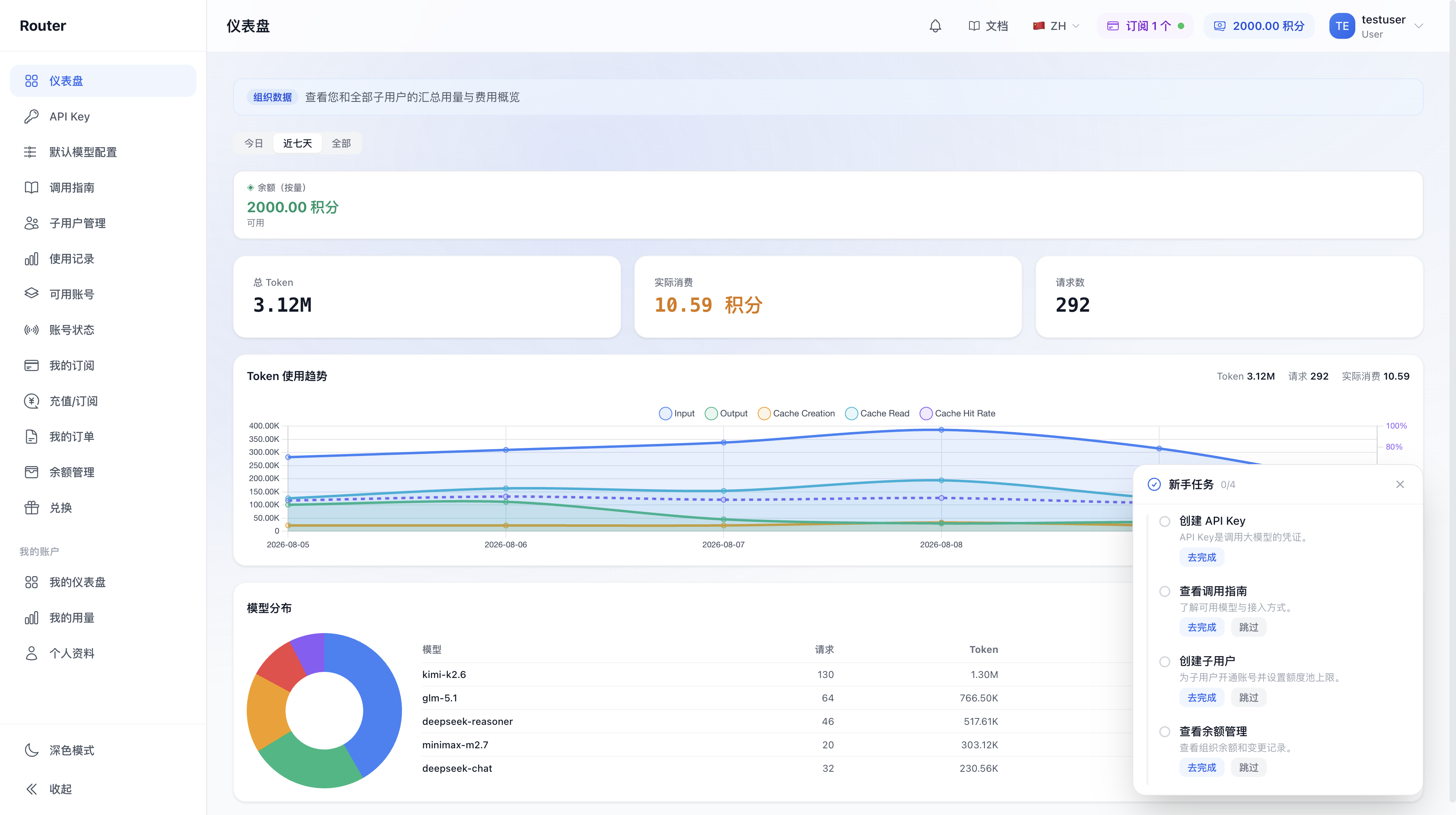
| Monitor spending trends on the dashboard regularly | Anticipate when funds will run out and top up in advance (see Billing and Usage) |
| Add finance / operations emails to notifications | Keep relevant colleagues informed |
Dashboard balance overview area:
5. FAQ
Q: What error is returned when balance is 0? A: The call is rejected with a message about insufficient balance / quota. The specific error code depends on the actual API response. The next request works immediately after topping up.
Q: All Keys under a specific member suddenly stop working, but others are fine. Why? A: Most likely their quota is exhausted. All Keys under one member share the same quota; once empty, all are rejected. Increase their quota pool limit (the total quota pool must have funds).
Q: How long does it take to recover after topping up? A: Immediately. After a successful top-up or quota adjustment, the next request works normally.
Q: Do Keys become invalid during the insufficient-funds period? A: No. The Keys themselves are retained; only calls are rejected when balance / quota is insufficient. They work again once funds are replenished.
Q: Where do I configure low balance alerts? A: On the "Profile" page, scroll down to the "Low Balance Alert" section. If the platform has not enabled this feature, this section does not appear on the page.