Platform Introduction
Applicable roles: Admin user, Member user Last updated: 2026-08-06
The platform provides unified model access, routing, usage statistics, and cost management capabilities. This page introduces the platform's capabilities and account structure.
1. Platform Positioning
The platform does not train models itself. Instead, it acts as a "middle layer": aggregating models from various providers into a single entry point. After connecting to the platform, you can call any enabled model through a unified API. The platform handles unified access, intelligent routing, usage statistics, and cost management.
If you are a legacy user, your account and balance are seamlessly retained -- no need to re-register. See Migration Guide for details.
2. Core Capabilities
2.1 Unified Multi-Model Access
A single API connects to all models currently available on the platform, with primary support for DeepSeek, Kimi, and other model services -- no need to integrate with each provider individually. The platform continuously maintains the model catalog based on service availability; the actual scope is subject to what the console displays.
The model plaza is where you browse all available models and pricing. In the model plaza you can:
- Browse models supported by the platform, filtered by provider
- View descriptions and pricing for each model
- Compare price differences across groups
The model plaza is on the website and can be accessed without logging in. After logging in to the console, you can also see the models and call names actually available to you. For the differences between the three viewing methods (model plaza, console "Call Guide", and the
/v1/modelsAPI), see Viewing Available Models.
2.2 Groups
What is a "group": A group is the concept you will interact with most when using the platform. Think of it as a service tier label -- the same model (e.g., deepseek-v4-flash) can be offered through different groups, and different groups may have different upstream channels, pricing, and discounts. When you create an API Key, you select a group for it, and subsequent calls using the model name will route through that group.
- The Call Guide menu is always visible. You can see currently available groups and their models on the "Call Guide" page in the console. Whether group identifier call names are displayed on the page is controlled by your own "Group Identifier Routing" toggle (the admin user enables it to see them; members inherit the admin user's setting), but the toggle does not control the menu entry itself.
- You can view the organization's accessible account scope on the "Available Accounts" page and check the health status of upstream accounts on the "Account Status" page.
- Group pricing and discounts are based on what the model plaza displays.
The term account in the interface (as in "Account Status" or "Available Accounts") refers to the upstream channels behind the models.
2.3 Pay-Per-Use Billing
The platform uses credits as a unified billing unit, simplifying multi-model, multi-channel billing into a single number. Money is deposited into the credit balance (total quota pool), and credits are deducted per call based on actual consumption and the pricing of the selected group.
- Instant top-up: 1 CNY = 1 credit
- Usage-based billing: Credits are deducted per call based on actual consumption and the selected group's pricing
- Multiple top-up methods: Supports redeem codes; online payment methods are displayed on the account page
- Transparent records: Consumption per call, usage statistics, and top-up/spending history are all viewable in the console
For full billing methods, discounts, and calculation examples, see Pricing.
2.4 Organization Management
The platform provides comprehensive organization management capabilities. There are only two user-facing roles, each with different capabilities:
| Role | Purpose | Who fills it |
|---|---|---|
| Admin user | Manages the organization's balance, members, Keys, and usage | Enterprise account holder |
| Member | Holds Keys to call models and views personal usage | Callers / developers under the organization |
Admin user dashboard after login:
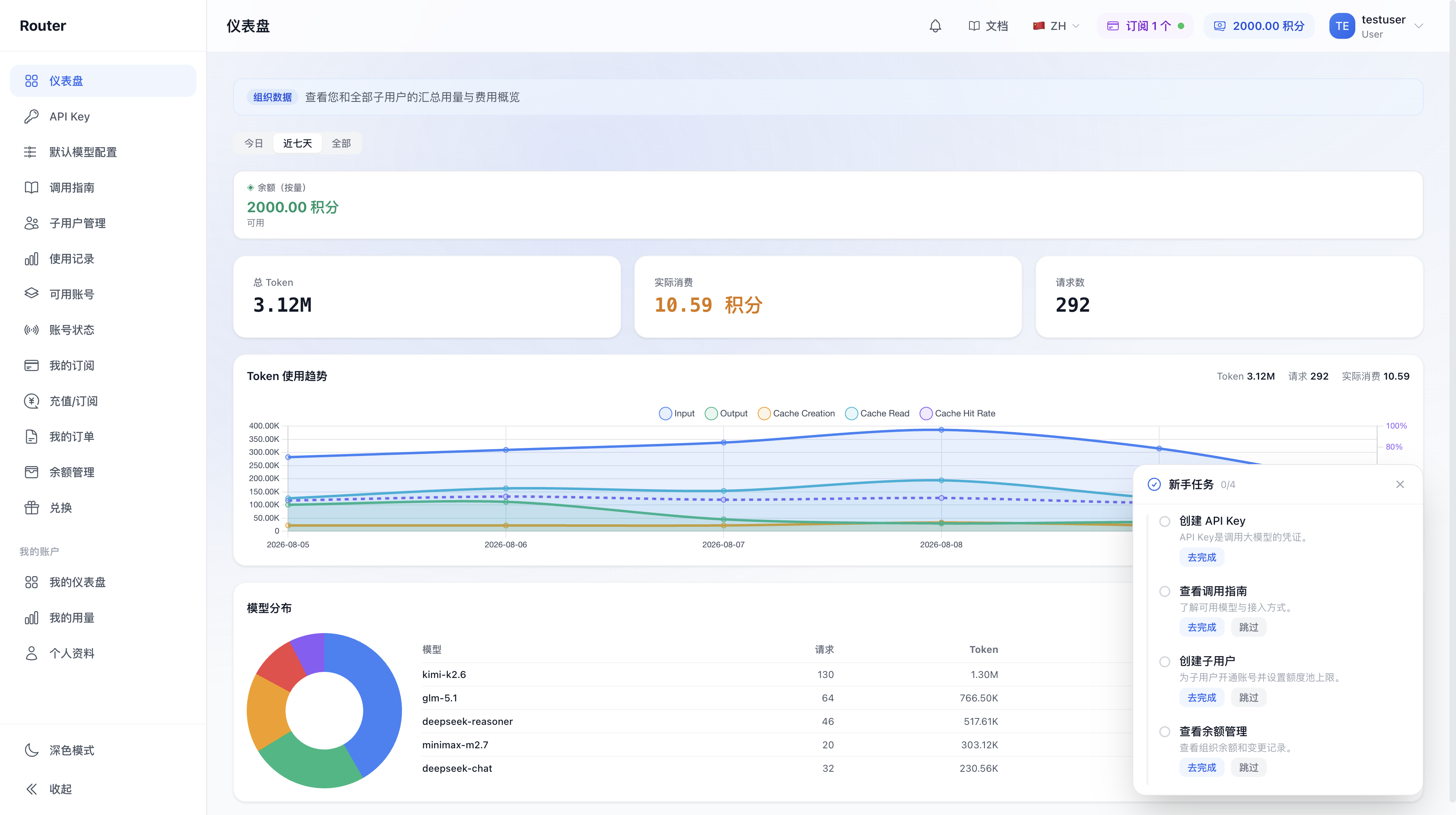
Core organization capabilities include:
- Credit balance (total quota pool): Unified top-up and billing -- all member consumption is deducted from here
- Member management: Create / edit / disable members, set business information and quota pool limits. See Member Management
- Key management: Create API Keys and bind each Key to a routing group. See API Keys and Routing Groups
- Usage monitoring: Admin users can view organization-wide usage (including members); members can only view their own
The legacy "tenant" corresponds to the current admin user, "member" corresponds to member user, and "model group" is now uniformly called group. At the funding level, "organization / total quota pool" still refers to the shared pool. For a complete terminology and capability comparison, see Migration Guide and Roles and Permissions.
3. Start Here
| I want to... | Where to look |
|---|---|
| Understand the difference between admin and member users | Account System |
| Register and create an organization account | Organization Registration |
| Manage members | Member Management |
| Create a Key and integrate it into code | API Keys and Routing Groups |
| Understand pricing and billing | Pricing |
| See which models I can use | Viewing Available Models |
| What changed after migrating from the legacy version | Migration Guide |
| I am a member -- where do I start | Member Guide |