Viewing Available Models
Applicable roles: Admin user, Member user Last updated: 2026-08-06
Available models can be viewed from the model plaza, the Call Guide, and the /v1/models API. These three entry points show different scopes. This page explains each one.
A "call name" is the model name string you put in your API request (e.g.,
deepseek-v4-flash). You need it to specify which model to use in your code or tools.
1. Two Key Concepts
| Concept | Meaning | Where to View |
|---|---|---|
| Models publicly available on the platform | Models the platform currently offers, displayed under public groups | Model plaza (no login required) |
| Models available to me | Models you can actually call, limited by the groups assigned by the admin user and the group bound to your Key | Console "Call Guide", /v1/models API (login / Key required) |
The model plaza shows publicly available models. "Models available to me" means models your current account can actually call. A model listed in the menu is not necessarily callable -- the actual scope depends on organization authorization, member assignment, and API Key binding.
Note: Groups that are not authorized or not assigned will not appear in the call list. To use
deepseek-v4-flashorkimi-k3, first confirm that the organization and your current user have the corresponding group. See Model Access and Group Authorization for details.
2. Method 1: Model Plaza (View Platform-Provided Models)
The model plaza is the platform's public model showcase and can be accessed without logging in. The entry point is on the platform's website homepage.
In the model plaza you can see:
- Models currently offered publicly by the platform and their providers
- Pricing for each model under each public group
- Price comparisons across groups
Best for: Not yet registered and want to explore what models the platform offers; or comparing pricing across groups.
The model plaza displays models that are priced and available under public groups. If your organization has private groups, the models in those groups will not appear in the model plaza -- you need to log in and check the Call Guide.
3. Method 2: Console "Call Guide" (View Available Models and Copy Call Names)
After logging in to the console, find "Call Guide" in the left sidebar menu. It lists all models actually available to you by group (including public groups and private groups you are authorized for), with copyable call names for each model:
- Model name (e.g.,
deepseek-v4-flash) -- calling with this routes through the group bound to your Key - Full call name with group identifier (e.g.,
A2C4E6G8/deepseek-v4-flash) -- directly targets a specific group (only available after the admin user enables "Group Identifier Routing")
Copy the call name and paste it into your code or tool configuration to use it.
Best for: Already logged in and want to confirm which models you can actually use, and copy call names into your code.
Admin users and members see different scopes:
- Admin user: Sees all models under public groups + authorized private groups
- Member: Within the organization's visible scope, further limited by the groups assigned by the admin user -- only the models you can actually call are displayed
The list only shows groups that are currently callable. Unauthorized, unassigned, or expired groups do not appear. So the number of groups shown may be fewer than you expect. Members only see groups that the admin user has assigned and that are currently active.
The "Call Guide" menu is always visible -- no toggle is needed. The Group Identifier Routing toggle controls whether group identifier call names are displayed on the page, not the menu entry itself.
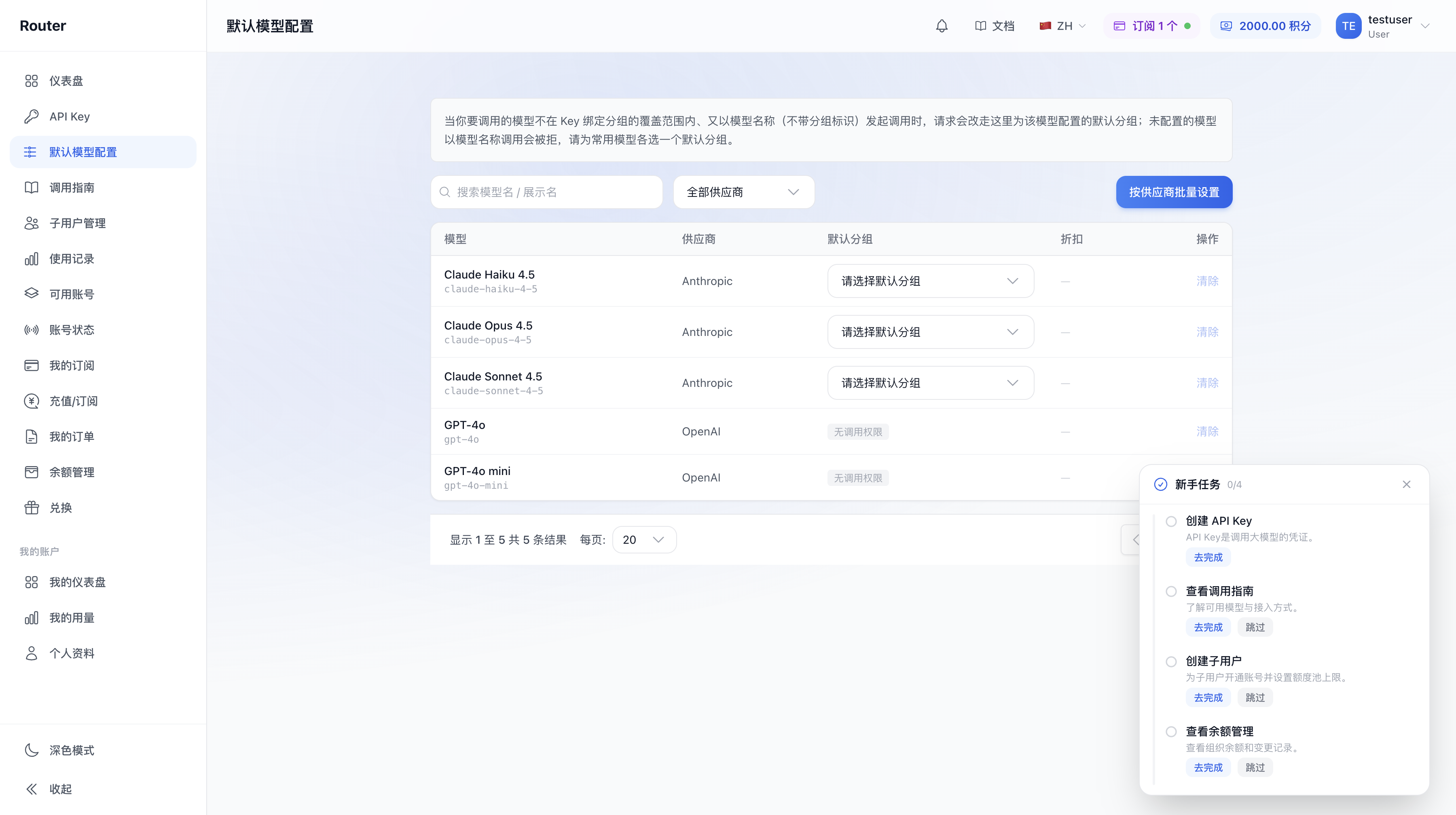
Default model configuration page (assign a default group per model here):
If you cannot find a particular model in the Call Guide, your organization has not been authorized for that model or its corresponding group. Contact the admin user or platform support.
4. Method 3: /v1/models API (Dynamic Retrieval in Code)
If you are writing code, you can query the list of models available to your current Key via the API:
curl <接口地址>/v1/models \
  -H "Authorization: Bearer YOUR_API_KEY"
(Use the API endpoint shown on the console "API Key" page.)
The response returns the list of available models under the group bound to the current Key.
Best for: Dynamically retrieving "which models this Key can use" in your program, without manually maintaining a list.
Notes:
- Different Keys bound to different groups may return different lists
- If you use a call name with a group identifier (specifying group routing), the models under the target group may not appear in this list. This calling method does not depend on this list -- as long as the group actually supports the model, the call will succeed
Authentication, endpoints, and other technical details are covered briefly here. For full usage, see Developer Guide - API Call Basics and Call Guide and Routing.
5. Comparison of the Three Methods
| Method | Scope | Login / Key Required | Best For |
|---|---|---|---|
| Model plaza | Priced and available models under public groups | No | Exploring platform-provided models, comparing group pricing |
| Console "Call Guide" | Models actually callable by your organization / Key (including private groups) | Login required | Looking up call names, copying into code, confirming available scope |
/v1/models API |
Models under the group bound to the current Key | API Key required | Dynamically retrieving callable model list in code |
All three share the same data source -- the model catalog configured under groups. The only difference is the filtering scope: the model plaza aggregates across all public groups, the Call Guide aggregates across your authorized groups, and the API returns results for the single group bound to the Key.
6. FAQ
Q: A model is in the model plaza but not in the Call Guide -- why? A: The model plaza shows models available under public groups, but your organization may not be authorized for all public groups. Contact the admin user or platform support to enable more groups.
Q: A model is in the Call Guide but not in the model plaza -- why? A: Your organization may have private groups whose models are only visible to authorized organizations and do not appear in the public model plaza.
Q: The /v1/models response differs from the Call Guide -- why?
A: The API returns models under the single group bound to the current Key, while the Call Guide is a summary of all your available groups. Multiple Keys bound to different groups will each return different lists, but combined they should match the Call Guide.
Q: How do I find the price of a particular model? A: Find the model in the model plaza to see its unit price under each public group. After logging in, the Call Guide also shows pricing for your available groups. The model plaza is the authoritative source.
Q: A member sees fewer models than the admin user? A: This is normal. A member's visible models are further limited by the groups assigned by the admin user. To access more models, ask the admin user to adjust group authorization, or create a Key bound to a different group.