Call Guide and Routing
Applicable roles: Developers, Admin Users, Member Users Last updated: 2026-08-06
This page explains the two ways to write the model field, routing priority, and how to obtain call names.
1. Basic Routing: Model Name Calls
In most scenarios, you fill in the model name in the model field (e.g., deepseek-v4-flash, kimi-k3), and the system automatically selects a routing group for you.
Routing Resolution Priority
Model name calls first require that the Key is bound to a routing group, then follow these rules:
| Order | Routing Source | Description |
|---|---|---|
| 0 | Key binding status | Returns 403 directly if no group is bound; default routing resolution is not attempted |
| 1 | Key's bound routing group | When the target model is in the bound group, that group is used directly |
| 2 | Current user's default routing configuration | Only when the target model is not in the bound group, the fallback group configured by the current user is checked |
| 3 | Admin user's default routing configuration | Checked when no candidate is found at the current user level; when the admin user makes the call, this layer is the same as the previous one |
- When neither default routing layer has an available candidate, the call is rejected
- When a bound group has its permissions revoked, is disabled, or its subscription expires, an error is returned directly; fallback does not mask permission changes
- When the selected account is unavailable, the platform returns an error and does not automatically switch or downgrade
Default Routing Configuration
Both admin users and member users can specify a fallback group for each model name. The Key must still be bound to a group; the default model configuration is only consulted when the target model is not in the bound group. The configuration entry is in the console, where you can set it per model or in bulk by provider.
Usage records display a source indicator for each call (group identifier / Key-bound group / member user default / admin user default), making it easy to trace routing decisions.
Default model configuration page:
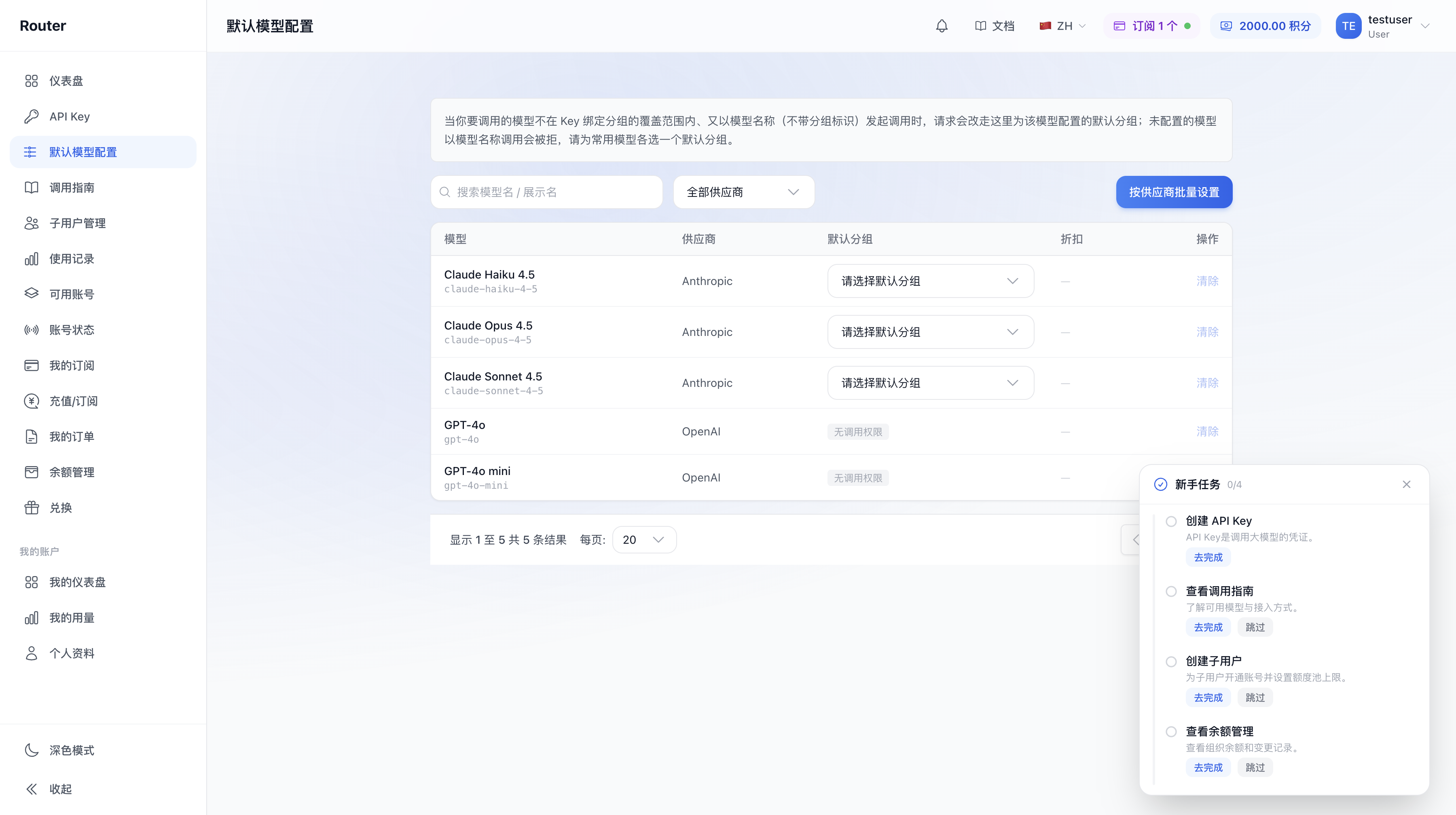
If the group configured in default routing has been delisted or no longer contains the model, the call returns an error and does not silently fall back to another group. In this case, you need to reconfigure the default routing.
2. Advanced Routing: Group Identifier Calls (Requires Enablement)
After enabling group identifier routing, you can prepend a group identifier before the model name, for example 5MHXZWKA/deepseek-v4-flash. The request goes directly to that group, bypassing Key binding and default routing configuration.
Enablement Conditions
This feature is enabled by the admin user in the organization settings. Once the toggle is active, users within the organization can use group identifier call names within their respective permission scopes. If the entry is not visible or calls are rejected, contact the admin user to confirm the organization settings.
Group Identifier Call Name Format
<group-identifier>/<model-name>Example: 5MHXZWKA/deepseek-v4-flash
5MHXZWKAis the group identifier — a short string automatically assigned by the platform for each routing group, which remains unchanged after creationdeepseek-v4-flashis the model name- When called, the request is routed directly to the group corresponding to that group identifier, regardless of the Key's bound group or the default routing configuration
The "Call Guide" Page
The Call Guide entry in the console's left menu is always visible. This page lists the currently available call names by group; when group identifier routing is enabled, it also displays call names with group identifiers:
- Model name button: Copies the model name (e.g.,
deepseek-v4-flash), using basic routing - Group identifier button: Copies the call name with the group identifier (e.g.,
5MHXZWKA/deepseek-v4-flash), using group identifier routing
The page supports switching by platform tab, keyword search, and filtering by exclusive/public groups.
When group identifier routing is not enabled, calls with a group identifier prefix are rejected. Plain model names can be obtained from the Call Guide page, the default model configuration page, or via the
/v1/modelsAPI.
3. Complete Routing Resolution Chain
When the platform receives a request, it first determines whether the model field contains a group identifier prefix (contains /):
Does the model field contain "/"?
├── Yes (e.g., 5MHXZWKA/deepseek-v4-flash)
│   └── Is group identifier routing enabled?
│       ├── Yes → Parse the group identifier
│       │   ├── Parse succeeded → Route to the corresponding group
│       │   └── Parse failed (invalid identifier or illegal format) → Reject
│       └── No → Reject (fingerprint_routing_disabled)
└── No (e.g., deepseek-v4-flash)
    └── Is the Key bound to a group?
        ├── No → Reject directly
        └── Yes → Is the target model in the bound group?
            ├── Yes → Use the bound group
            └── No → Current user default → Admin user default
                ├── Available candidate found → Route to that group
                └── No candidate found → Reject
4. Which Approach for Which Scenario
| Scenario | Recommendation |
|---|---|
| Legacy scripts / existing clients already running | Use the model name — zero changes needed to continue |
| Key's bound group does not include certain target models | Set a fallback group for those models in the default model configuration |
| Want to temporarily switch a single Key to a different group | After enabling group identifier routing, use a call name with the group identifier to specify the group |
| Not sure how to write the call name | Using the model name is simplest; consider group identifiers only when you need precise control over group selection |
| A subscription Key wants to call a different group | After enabling group identifier routing + cross-group subscription calls, use call names with group identifiers to call across groups (deducted from the subscription quota) |
5. Call Examples
Model name (basic routing):
curl https://<your-api-endpoint>/v1/chat/completions \
  -H "Authorization: Bearer sk-xxx" \
  -H "Content-Type: application/json" \
  -d '{
    "model": "deepseek-v4-flash",
    "messages": [{"role": "user", "content": "你好"}]
  }'
With group identifier (group identifier routing, requires enablement):
curl https://<your-api-endpoint>/v1/chat/completions \
  -H "Authorization: Bearer sk-xxx" \
  -H "Content-Type: application/json" \
  -d '{
    "model": "5MHXZWKA/deepseek-v4-flash",
    "messages": [{"role": "user", "content": "你好"}]
  }'
For general rules on endpoints, authentication, streaming, etc., see API Call Basics.
6. FAQ
Q: Do I have to enable group identifier routing? A: No. In most scenarios, binding a group to your Key and using model names is sufficient; you can configure a fallback group when the target model is not in the bound group. Group identifier routing is an advanced capability for precisely specifying a group — enable it as needed.
Q: Is there a billing difference between group identifier and model name calls? A: Billing is based on the pricing of the group that is actually hit, regardless of how the call name is written — it depends on which group the request ultimately routes to.
Q: Can I mix model name and group identifier calls with the same Key?
A: Yes (when group identifier routing is enabled). The platform determines the routing for each request based on whether the model field contains a group identifier. Note: if this Key is bound to a subscription group, cross-group calls using group identifiers also require enabling "cross-group subscription calls"; otherwise, cross-group calls are rejected. See Subscription Management and Member Allocation for details.
Q: What should I do if a group identifier call returns fingerprint_routing_disabled or group_not_allowed?
A: fingerprint_routing_disabled means group identifier routing is not enabled — contact the admin user to enable it in the organization settings. group_not_allowed means the group corresponding to that group identifier is not within your account's available scope, or the account is currently unavailable. Verify your available scope or contact the platform.
Q: I configured default routing but the call returns an error? A: Check whether the configured group still contains the model. After a group is delisted or a model is removed, the corresponding default routing configuration becomes invalid and needs to be reconfigured.
Q: What is the "source" in usage records? A: It indicates which layer matched for this call — group identifier, Key-bound group, member user default, or admin user default — making it easy to trace routing decisions.
Q: What happens to existing group identifier calls after group identifier routing is disabled? A: They are rejected. After disabling group identifier routing, all calls with a group identifier prefix are no longer recognized and must be changed to use model names.