Roles and Permissions
Applicable roles: Admin user, Member user Last updated: 2026-08-06
This page compares the permissions of admin users and members, and lists organization-level matters that require platform assistance.
For conceptual background on the account system, see Account System.
1. Role Definitions
| Role | Primary Responsibilities |
|---|---|
| Admin user | Enterprise account holder; manages the organization's credit balance (total quota pool), members, Keys, and usage |
| Member | Caller under the organization; manages their own Keys and usage |
Platform-side configuration (model onboarding, pricing, concurrency limits, available model scope, organization provisioning) is handled by the platform and does not belong to user roles in the console. Contact the platform when adjustments are needed.
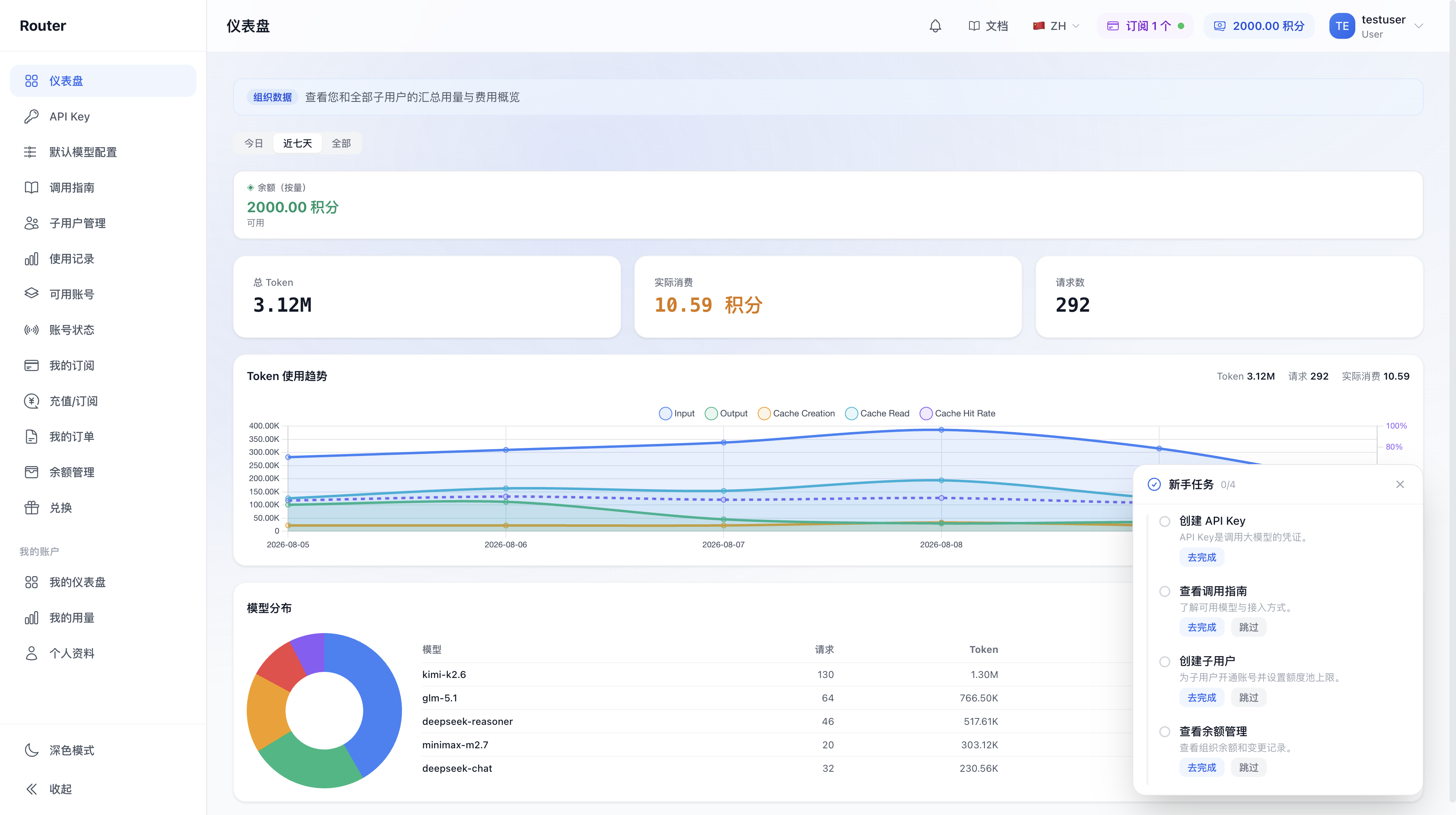
Admin user sidebar after login (more menu items; some controlled by toggles):
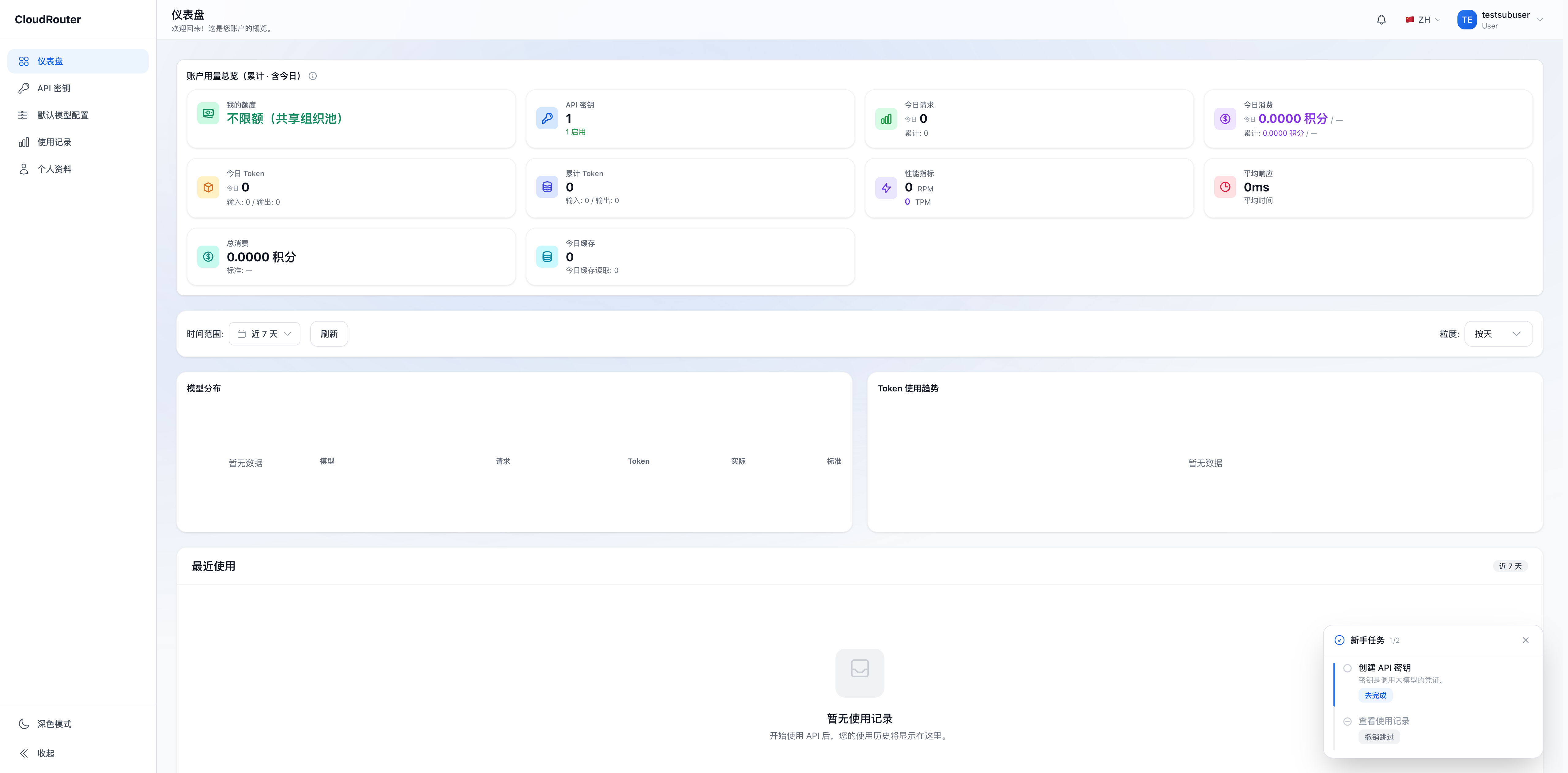
Member sidebar after login (basic menu items + My Subscriptions; "Call Guide" is always visible):
2. Permission Comparison
Yes = can operate | No = no permission | Own scope = limited to own organization / own data
Account and Members
| Capability | Admin User | Member |
|---|---|---|
| Create / edit / disable members | Yes (own scope) | No |
| Set member business identity (username / delivery email) | Yes (own scope) | No |
| Set member quota pool limit | Yes (own scope) | No |
| Authorize groups available to a member | Yes (own scope) | No |
| Edit own profile and password | Yes | Yes (own scope) |
Organization account provisioning and disabling are handled by the platform. Contact the platform when needed.
Funding and Quota
| Capability | Admin User | Member |
|---|---|---|
| Online top-up / redeem code top-up | Yes (own scope) | No |
| View organization balance history | Yes (own scope) | No |
| Download payment receipts / request invoices | Yes (own scope) | No |
| Refund | No (contact the platform) | No |
| View own usage | Yes | Yes (own scope) |
| View organization-wide usage (including members) | Yes (own scope) | No |
Keys and Calls
| Capability | Admin User | Member |
|---|---|---|
| Create API Key | Yes | Yes (own scope) (groups limited to authorized scope) |
| Bind / change routing group for a Key | Yes (own scope) | Own scope (own Keys, authorized groups only) |
| Set Key IP restrictions, quota limits, expiration | Yes (own scope) | Own scope (own Keys) |
| Assign a default group per model in "Default Model Configuration" | Yes | Yes (own scope) |
| Toggle "Group Identifier Routing" advanced switch | Yes (own scope) | No (read-only, inherits admin user's setting) |
| View "Call Guide" | Yes | Yes (own scope) |
| Call models | Yes | Yes (own scope) |
The Call Guide menu is always visible. When the toggle is off, group identifier call names are not displayed on the page and calls with a group identifier are rejected, but calls using the model name work normally.
3. Matters Requiring Platform Assistance
The following matters cannot be completed by admin users or members in the console and are configured by the platform. Contact the platform when needed:
| Matter | Reason | What to Do |
|---|---|---|
| Increase organization concurrency limit | Involves platform resource allocation | Contact the platform to adjust. See Concurrency Settings |
| Adjust group authorization scope | Platform-level resource control | Configured by the platform. See Model Access and Group Authorization |
| Request new model groups | Platform authorization | Contact the platform -- no self-service entry. See Model Access and Group Authorization |
| Organization account provisioning / disabling | Involves account ownership | Contact the platform |
| Refund | Involves financial security | Contact the platform with the order number |
| Launch new models / adjust model pricing | Platform operational decision | Follow system announcements |
| Enable Available Accounts, Account Status, Top-Up/Subscription, and other toggle-controlled entries | Platform feature toggle | Contact the platform to enable |
4. The Admin User's "Dual Role"
The admin user is both a "manager" and a "caller": they can manage members and set quotas, and also create their own Keys to call models. Two things to note:
- Quota is set for members: The quota pool limit is for members; the admin user's own consumption is deducted directly from the total quota pool
- You cannot disable / delete yourself: To change the account holder, contact the platform
5. Key Management for Members
- Members can create Keys on their own: Members can create multiple Keys on the "API Key" page, each independently named. When creating a Key, you must select a routing group (only from groups authorized by the admin user), subject to the quota pool limit. The admin user can also create and distribute Keys on behalf of members. See Member Management for details.
- Ways to restrict a member: In the "Edit" dialog, you can change the member's status to "Disabled", or reduce / exhaust their quota pool limit to restrict their calls (when quota is exhausted, all Keys under that member are rejected).